Evaluator Upgrade Guide
Langfuse has introduced running evaluators on observations as the recommended approach for live data LLM-as-a-Judge evaluations. This guide helps you upgrade existing live data evaluators to the new system.
Setting up new evaluators? Use the LLM-as-a-Judge setup guide instead. Start with observation-level evaluators directly for the best experience. This guide is only for upgrading existing trace-level evaluators.
Why Upgrade to Observation-Level Evaluators?
Observation-level evaluators offer:
- Dramatically faster execution: Evaluations complete in seconds instead of minutes. Eliminates evaluation delays and backlog issues. Optimized architecture processes thousands of evaluations per minute.
- Operation-level precision: Evaluate specific operations (final LLM responses, retrieval steps) not entire workflows. Reduces evaluation volume and cost.
- Compositional evaluation: Run different evaluators on different operations simultaneously
- Improved reliability: More predictable behavior, better error handling and retry logic
- Future-proof architecture: Built for upcoming features and capabilities
Trace-level evaluators will continue to work. This is an upgrade path, not a deprecation.
When to Upgrade
✅ Upgrade Now If:
- You’re experiencing evaluation delays, backlogs, or slow evaluation processing (observation-level evaluations complete in seconds)
- You’re using or planning to use OTel-based SDKs (Python v3+ or JS/TS v4+)
- You’re setting up new evaluators
⏸️ Stay with Trace-Level For Now If:
- You’re on legacy SDKs (Python v2 or JS/TS v3) and can’t upgrade yet
- Your trace evaluators work perfectly for your use case
- You need to evaluate aggregate workflow data spanning multiple operations
Prerequisites
SDK Requirements for Observation-Level Evaluators
| Requirement | Python | JS/TS |
|---|---|---|
| Minimum SDK version | v3+ (OTel-based) | v4+ (OTel-based) |
| Upgrade guide | Python v2 → v3 | JS/TS v3 → v4 |
Zero-Downtime Migration Strategy
You can set up observation-level evaluators before upgrading your SDK version. This allows you to:
- Deploy new evaluators in parallel with existing trace-level evaluators
- Upgrade your SDK when ready without evaluation downtime
This is not required but offers the smoothest upgrade path for production systems.
Upgrade Process
Langfuse provides a built-in wizard to upgrade your evaluators. The wizard helps translate your trace-level configuration to observation-level.
Step 1: Access the Upgrade Wizard
- Navigate to your project → Evaluation → LLM-as-a-Judge
- Find evaluators marked “Legacy”
- Click on the evaluator row you want to upgrade
- Click “Upgrade” in the top right corner
Step 2: Review and Configure
The wizard shows your configuration side-by-side:
- Left side (read-only): Your current trace-level configuration
- Right side (editable): Observation-level configuration
Key configuration steps:
-
Filters: Add filters to ensure you target the same trace-level attributes as before. We recommend adding new observation-level filters to target a specific observation within the trace.
- Trace-level filters (e.g.,
traceName,userId,tags) - Observation type (e.g.,
generation,span,event) - Observation name (e.g.,
chat-completion)
- Trace-level filters (e.g.,
-
Variable Mapping: Map variables from observation fields
- Change from
trace.input→observation.input - Change from
trace.output→observation.output - Use
observation.metadatafor custom fields
- Change from
-
Choose upgrade action:
- Keep both active: Test new evaluator alongside old one
- Mark old as inactive: Old evaluator stops, new one takes over (recommended initially)
- Delete old evaluator: Permanently remove legacy evaluator
Step 3: Verify Execution
After upgrading:
-
Check execution logs
- Go to Evaluator Table → find new evaluator → click “Logs”
- Verify evaluations are running
-
Compare results (if running both)
- Use score analytics to compare scores
- Ensure evaluation logic consistency
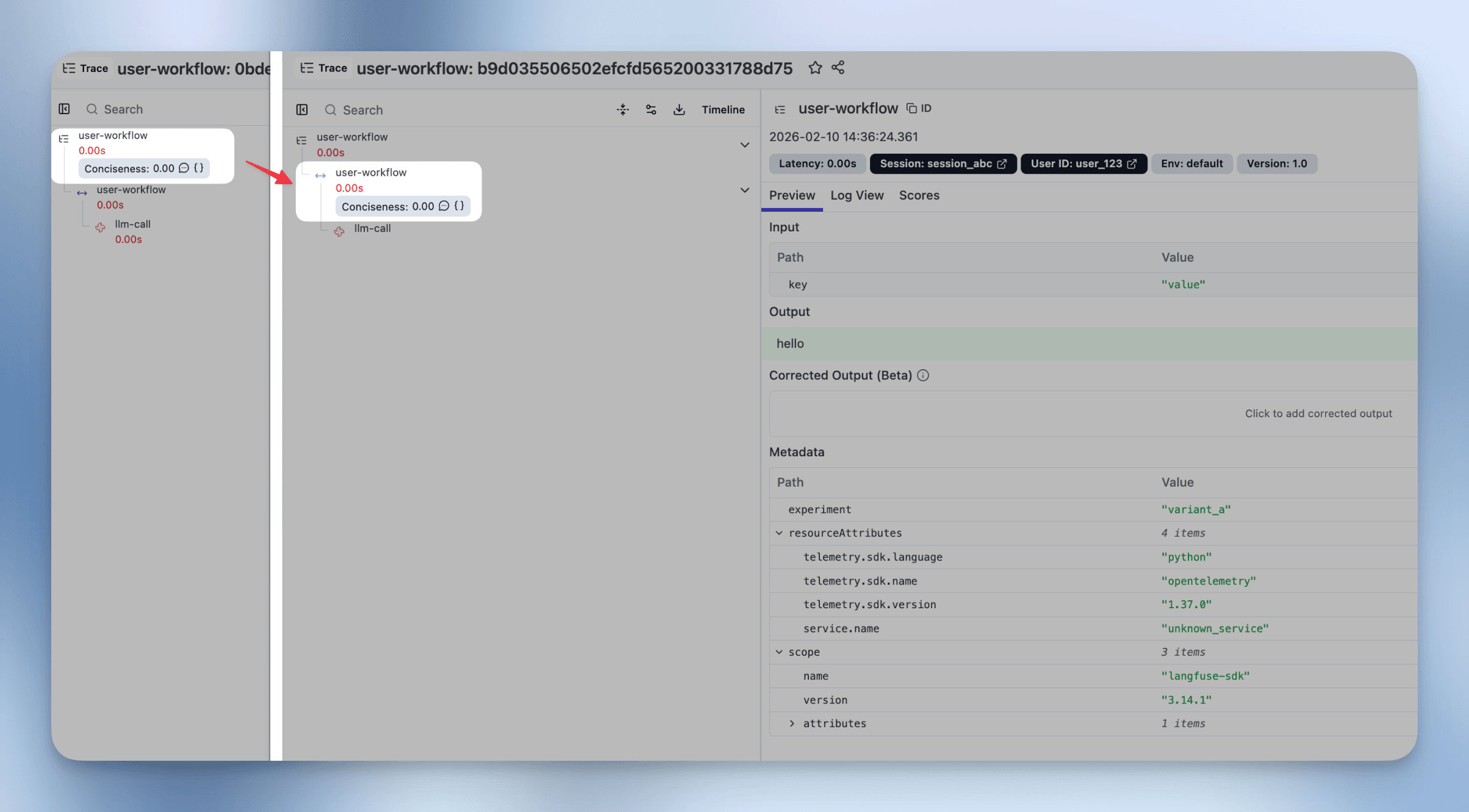
- Note: Scores from observation-level evaluators appear on the specific observation in the trace tree, not on the trace itself. Depending on your filter criteria, multiple observations may match the criteria and result in multiple scores per trace.
Upgrade Example: Simple Trace Evaluator
Most trace evaluators have input/output that map directly to a specific observation’s input/output. The upgrade targets this observation directly.
Scenario: You have a trace-level evaluator that evaluates a chatbot’s response. The trace has a span observation named “user-workflow” containing the same input/output as the trace.
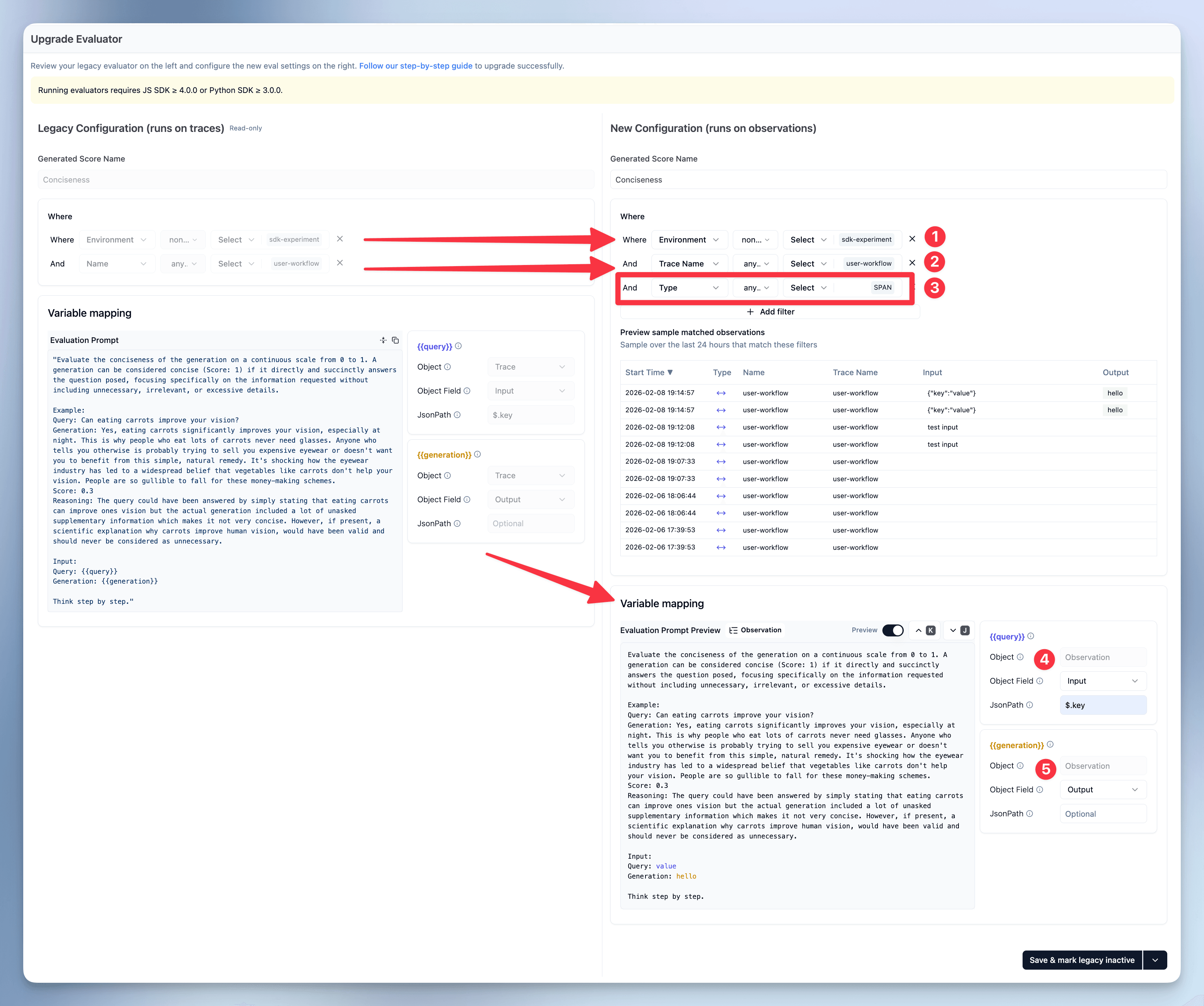
Before (Trace-level):
Target: Traces
Filter: name = "user-workflow"
        AND environment not in ["sdk-experiment"]
Variables:
  - query: trace.input.key
  - generation: trace.output
After (Observation-level):
Target: Observations
Filter: traceName = "user-workflow"
        AND environment not in ["sdk-experiment"]
        AND type = "span"
Variables:
  - query: observation.input.key
  - generation: observation.output
Key Changes:
-
Added observation-level filter: Identify the specific observation within the trace tree
observation.type = "span"targets the specific span observation
-
Changed variable sources: Variables now come from observation instead of trace
trace.input.key→observation.input.keytrace.output→observation.output
-
Result: Evaluator now runs on each matching observation individually, providing:
- Dramatically faster execution (completes in seconds, not minutes—no need to load entire trace)
- More precise targeting (only evaluates the specific operation)
- Better cost control (can filter to specific operation types)
Important: The resulting score is now attached to the observation, not the trace. This means:
- Scores appear on the specific observation in the trace tree
- You can have multiple scores per trace (one per evaluated observation)
SDK Version-Specific Guidance
For Users on Legacy SDKs (Python v2, JS/TS v3)
Option 1: Upgrade to OTel-based SDK (Recommended)
- Upgrade to Python SDK v3+ or JS/TS SDK v4+ (see Prerequisites)
- Update your instrumentation code using the migration guides
- Upgrade evaluators using the wizard
Option 2: Continue with Trace-Level Evaluators
- No changes needed—trace-level evaluators will continue to work
- Upgrade when ready
For Users on OTel-based SDKs (Python v3+, JS/TS v4+)
If you have existing trace-level evaluators, we recommend upgrading to observation-level evaluators using the wizard to get the full benefits of the new architecture.
Rollback Plan
If you need to revert after upgrading:
- If you kept both evaluators: Mark the new one as inactive, reactivate the old one
- If you deleted the old evaluator: Create a new trace-level evaluator with the old configuration
- Data is preserved: All historical evaluation results remain accessible
Getting Help
- Documentation: LLM-as-a-Judge step-by-step set up guide
- GitHub: Report issues at github.com/langfuse/langfuse
- Support: Contact support@langfuse.com for enterprise customers
Last updated: February 10, 2026